YouTube Without the Algorithm
You hand your kid a tablet with one video queued up. Twenty minutes later they’re three rabbit holes deep into something you never approved. That’s not a failure of parenting — that’s just how YouTube works. The algorithm’s job is to keep kids watching, not to keep them watching good stuff.
I grew up on Nova, Scientific American Frontiers and Modern Marvels. Those shows got me into STEM and eventually into computers. I want something like that for my boys…not a locked-down screen, but programming built with intent and outcomes. So I built it.
Here’s what it does: I find a video I want my son to watch, send the URL to a dedicated email address, and it’s on Plex within 15 minutes. My wife can do it. The grandparents can do it. Nobody needs to touch a server. Wins all around.
This does require a server, running Docker, n8n, and Plex. If that’s not for you, this post might still be useful for the idea, or for forwarding to someone who could set it up. If it is you, here’s the full setup.
Disclosure: AI helped me refine this post and saved some time troubleshooting building this one Saturday morning.
The Workflow
At a high level:
- Find videos you want, grab the URLs.
- Send them to a dedicated email address.
- Videos are available on Plex within 10–15 minutes.
Workflow 1 — Store Incoming URLs
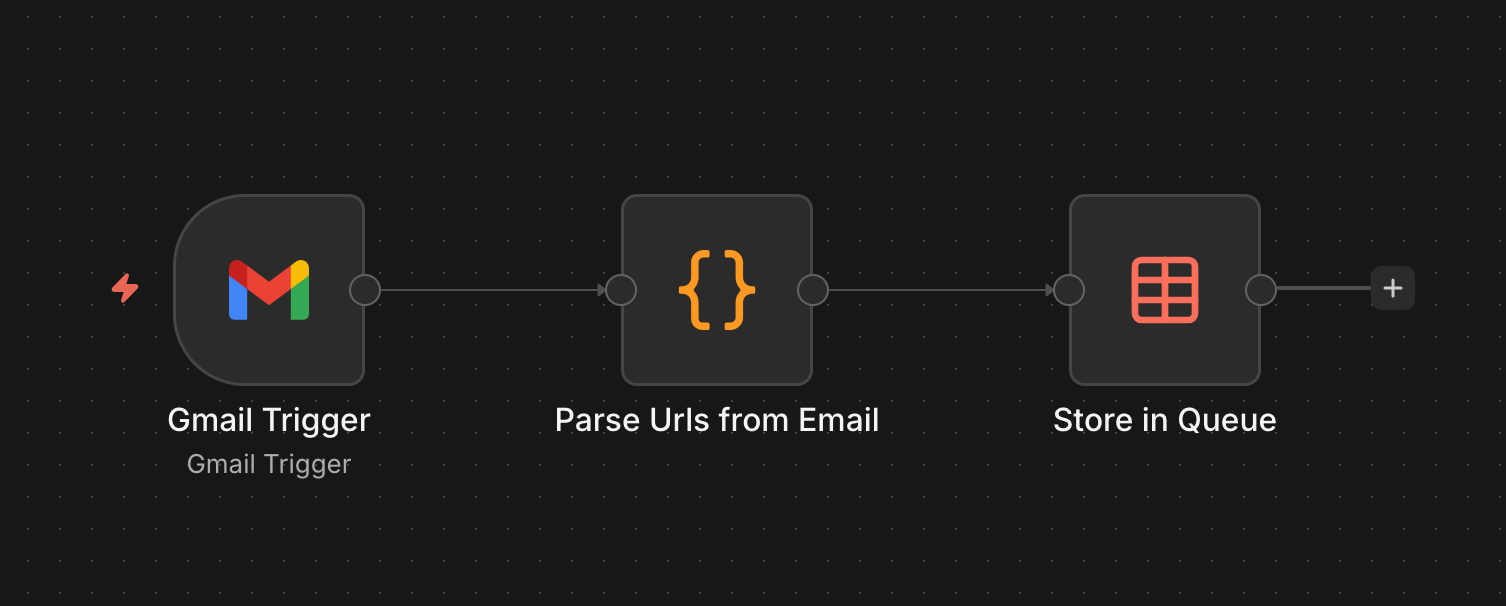
A Gmail trigger watches the inbox, parses any YouTube URLs out of the email body, and stores them in a Data Table for processing. I filter by sender so random spam doesn’t make it through — an allowlist is a must here.
Here’s the URL parsing code (Claude helped get this going quickly):
const items = $input.all();
const results = [];
const DOMAINS = ['youtube.com', 'youtu.be'];
const ALLOWED_SENDERS = ['email1@example.com', 'email2@example.com'];

for (const item of items) {
  const raw = item.json.headers?.subject || '';
  const subject = raw.indexOf(': ') >= 0 ? raw.slice(raw.indexOf(': ') + 2).trim() : raw.trim();
  const from = item.json.from?.text || '';

  const fromEmail = (from.match(/<(.+?)>/) || [null, from])[1].trim().toLowerCase();
  if (!ALLOWED_SENDERS.includes(fromEmail)) continue;

  const lines = (item.json.text || '').split('\n');
  for (const line of lines) {
    const url = line.trim();
    if (!url.startsWith('http')) continue;
    const noProto = url.replace('https://', '').replace('http://', '');
    const rawHost = noProto.split('/')[0];
    const host = rawHost.startsWith('www.') ? rawHost.slice(4) : rawHost;
    if (DOMAINS.indexOf(host) > -1) {
      results.push({ json: { url, from, subject, messageId: item.json.id } });
    }
  }
}
return results;
The Data Table schema:
url,status,from_email,subject,queued_at,title,channel,site_name,skipped,downloaded_at,error_message
https://www.youtube.com/watch?v=rjFxthTkw7A,done,"""Lee McKinnon"" <foobar@example.com>",,2026-04-05T17:21:21.752Z,How To Draw A Scary Witch Folding Surprise,Art for Kids Hub,YouTube,1,2026-04-05T17:40:43.261Z,
Workflow 2 - Download Videos
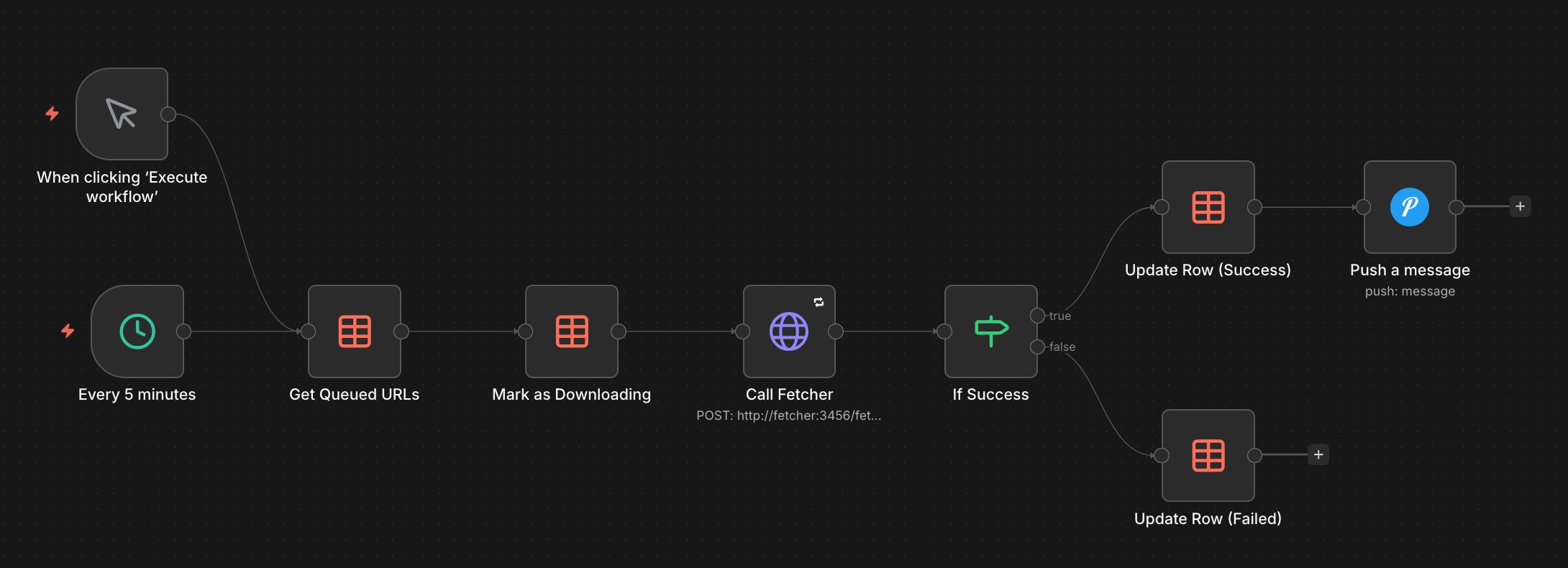
A second workflow runs separately and picks up queued URLs one at a time. I split this out because a single long-running workflow kept timing out or running into other wierd issues that were cumbersome to debug. This one marks each URL as “downloading,” calls yt-dlp via a small Python wrapper I wrote for Docker compatibility, then sends a Pushover notification when it’s done. Videos land in a NAS folder that Plex scans periodically.
One bug I haven’t fixed: downloads that fail silently stay stuck at “downloading” forever. I have a safeguard in place to ensure videos aren’t too long or too large, they silently fail…for now.
A Few Things Worth Knowing Before You Build This
The allowlist isn’t optional. Early on I got spam with YouTube links that made it into the queue. Nothing harmful got through, but it was a reminder that anything internet-facing needs filtering at the door.
Set up failure notifications. OAuth with Google has been flaky a couple times. Without Pushover alerts I wouldn’t have known videos weren’t downloading until my son asked why something wasn’t there.
This has been running for about a month now. My son watches videos helping him draw, get inspired with building STEM-related projects, watch safe music videos (this has been a favorite recently).
If you found this helpful, need help or have comments, do send them my way! blog@mckinnon.dev