YouTube Without the Algorithm

I grew up on Nova, Scientific American Frontiers and Modern Marvels. Those shows got me into STEM and eventually into computers. I wanted something like that for my boys…content that’s not only interesting but somewhat educational as well. So I built something.
I had three goals:
- I need an easy way to safely curate videos for my kids.
- It has to be simple enough for my wife and the grandparents to use.
- Must be easy to view content.
With those in mind, here’s what I do now: I find a video I’m ok with my son watching, I’ll send the YouTube URL (or several) to a dedicated email address, and minutes later it’s available.
To get this working, I’m using a combination of: Docker, n8n, and Plex. Proxmox powers my little home lab on a BeeLink PC.
Disclosure: AI helped me refine this post and saved some time troubleshooting building this one Saturday morning.
The Workflow
At a high level, this works in the simplest way possible with existing building blocks:
- Find videos you want, copy the URLs.
- Send them to a dedicated email address.
- Videos are available on Plex within 10–15 minutes.
Workflow 1 — Store Incoming URLs
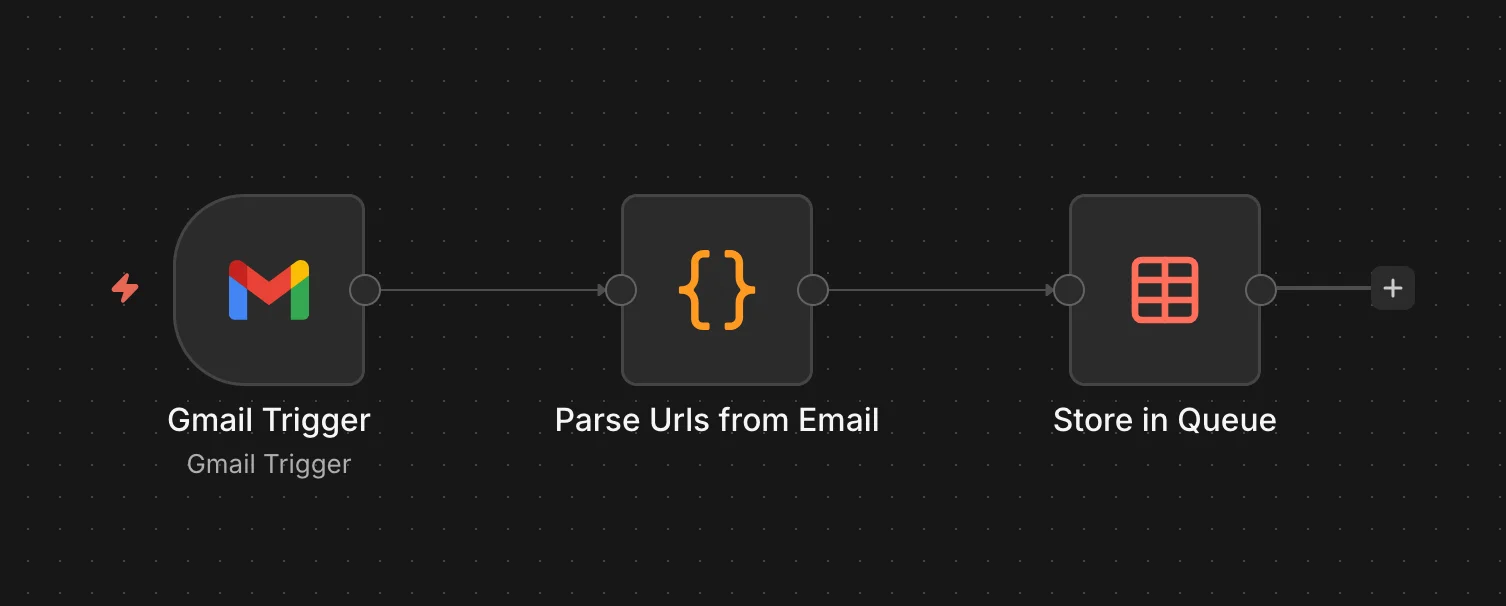
n8n is setup with a Gmail trigger which watches the inbox, parses any YouTube URLs out of the email body and stores them in a Data Table for processing.
Here’s the URL parsing code for reference:
const items = $input.all();
const results = [];
const DOMAINS = ['youtube.com', 'youtu.be'];
const ALLOWED_SENDERS = ['email1@example.com', 'email2@example.com'];

for (const item of items) {
  const raw = item.json.headers?.subject || '';
  const subject = raw.indexOf(': ') >= 0 ? raw.slice(raw.indexOf(': ') + 2).trim() : raw.trim();
  const from = item.json.from?.text || '';

  const fromEmail = (from.match(/<(.+?)>/) || [null, from])[1].trim().toLowerCase();
  if (!ALLOWED_SENDERS.includes(fromEmail)) continue;

  const lines = (item.json.text || '').split('\n');
  for (const line of lines) {
    const url = line.trim();
    if (!url.startsWith('http')) continue;
    const noProto = url.replace('https://', '').replace('http://', '');
    const rawHost = noProto.split('/')[0];
    const host = rawHost.startsWith('www.') ? rawHost.slice(4) : rawHost;
    if (DOMAINS.indexOf(host) > -1) {
      results.push({ json: { url, from, subject, messageId: item.json.id } });
    }
  }
}
return results;
The Data Table schema is fairly basic as well:
url,status,from_email,subject,queued_at,title,channel,site_name,skipped,downloaded_at,error_message
https://www.youtube.com/watch?v=rjFxthTkw7A,done,"""Dad"" <foobar@example.com>",,2026-04-05T17:21:21.752Z,How To Draw A Scary Witch Folding Surprise,Art for Kids Hub,YouTube,1,2026-04-05T17:40:43.261Z,
Workflow 2 - Download Videos
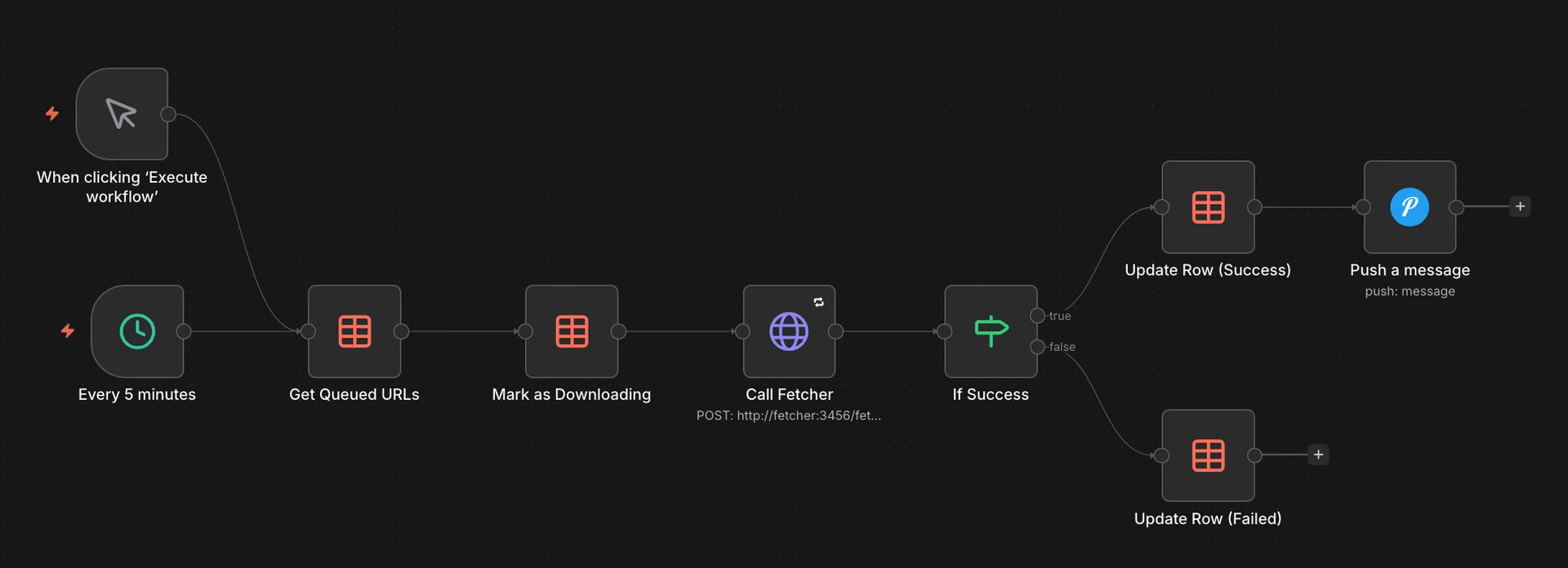
A second workflow runs separately and picks up queued URLs one at a time. I split this out because a single long-running workflow kept timing out or kept running into other wierd issues that were cumbersome to debug. This one marks each URL as “downloading,” calls yt-dlp via a small Python wrapper, then sends a Pushover notification when it’s done. Videos land in a NAS folder that Plex scans periodically.
One bug I haven’t fixed is that downloads that fail silently stay stuck at “downloading” forever. I have a safeguard in place to ensure videos aren’t too long or too large so they silently fail…for now.
Some Learnings
The allowlist isn’t optional. Early on I got spam with YouTube links that made it into the queue. Nothing harmful got through, but it was a reminder that anything internet-facing needs filtering at the door.
Set up failure notifications. OAuth with Google has been flaky a couple times. Without Pushover alerts I wouldn’t have known videos weren’t downloading until my son asked why something wasn’t there.
This has been running for about a month now, with much fanfare. My son now gets inspired with building STEM-related project and plays a handful of safe music videos, this has been a favorite recently.